
Sellfy Review 2026: How Good Is This Ecommerce Platform?

If you’re trying to sell online without drowning in tech headaches, complicated setups, or endless “advanced” features you’ll never use, this is for you.
Sellfy promises something most ecommerce platforms don’t. Fast setup. No fluff. And everything you need to start selling right away, whether that’s digital products, physical goods, or print on demand.
But does it actually deliver? Or is it just another platform that sounds good on the surface and falls apart once you start using it?
In this Sellfy review, we’re breaking it all down. What Sellfy does well, where it falls short, who it’s best for, and whether it’s worth your money if you want to get selling quickly without overcomplicating things.
What is Sellfy?
Sellfy is built for creators who want to sell without friction.
At its core, it gives you a clean, all in one platform to sell digital products directly to your audience. That includes ebooks, videos, music, design assets, photography, software, and online courses. You can also sell physical products and print on demand merch, which makes it a surprisingly flexible option if you want to expand beyond digital later on.

The big appeal is speed and simplicity. Sellfy often says you can launch a store in five minutes. Realistically, you will probably spend a bit longer dialing things in, but they’re not wrong.
You do not need technical skills, plugins, or third party tools to get up and running. Everything is built in.
Once your store is live, Sellfy gives you a solid set of tools to customize your storefront, manage products, handle payments, and actually drive sales. From checkout and file delivery to discounts, upsells, and email marketing, the platform is designed to remove complexity and let you focus on creating and selling, not maintaining software.
In short, Sellfy is not trying to be everything to everyone. It is designed to be fast, creator friendly, and conversion focused. And for most people, that is exactly what matters.
Sellfy features
Now let’s talk about all the tools you’ll have access to once you subscribe to the service.
Storefront
Using Sellfy to create an online storefront is not only easy, but it’s also fun as well. Sellfy allows you to customize your sales page so it reflects your branding. You can add your logo, change the colors, and configure the layout. You can also use an existing domain to inspire confidence.

The shopping cart feature encourages users to purchase more than one item at a time. And if your customers don’t speak English, Sellfy will automatically translate your storefront based on a user’s geographical location.
All Sellfy storefronts are mobile-optimized meaning they will look beautiful whether a customer browses them using a desktop, laptop, tablet, or phone.
It’s store customization at its finest.
Ecommerce
Sellfy allows you to sell different kinds of goods and subscriptions. Not only does it allow you to sell digital products, you can also sell physical goods.
But here’s another feature that makes Sellfy a great platform; print on demand.
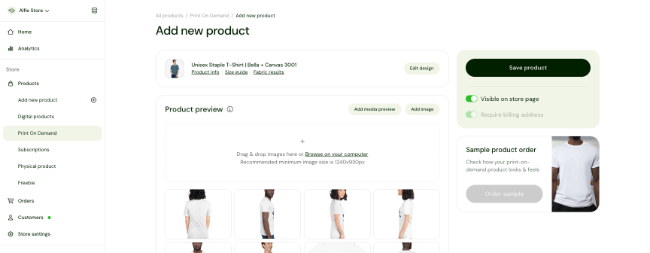
That’s right. You can offer shirts, mugs, hoodies, and other printed products. Sellfy will take care of all the printing. As new orders come in, Sellfy will print and ship them to customers. All you need to do is provide the design.
What I love most about this is that you don’t need to integrate a third-party app. This is a native feature which is rare to find in these kinds of ecommerce platforms.
There’s also a subscription feature available. You can charge customers weekly, monthly, or yearly depending on what you think is right for your business.
And if you’re offering video content, the video-on-demand feature makes sure that there’s little to no risk of piracy since all videos are streamed. It also gets rid of the issues associated with video downloads.
Marketing
Sellfy doesn’t just help you list products. It helps you sell more of them.
You can use built in upsells to nudge customers toward additional digital products at checkout and increase your average order value without extra effort.

If you’re running paid traffic, Sellfy supports ad pixels for platforms like Facebook and Twitter, so you can launch campaigns and track performance properly instead of guessing what works.
Discounts are another big win. You can create discount codes in seconds to run promos, reward loyal customers, or give hesitant buyers that final push to purchase.
You also get native email marketing tools, which let you send newsletters, product updates, and promotions straight to your audience without needing a separate service.
Put it all together and you end up with a platform that does more than host your store. It actively helps your business grow and compete at a serious level.
Embed
With Sellfy, users can buy products through your website or social media. The store embed function can transform any website into an ecommerce store. It does this by allowing you to embed a store with all of your products in it.
But you do have other options if you don’t want to go this route.
You can provide your social media followers with links to your products. It’s also possible to add Sellfy end screen cards to your YouTube videos.
Any page on your website can turn into a sales page. You can either add product cards to your content or insert buy now buttons.
Product access
There are measures in place to make the checkout experience more convenient for you and your customers.
For one thing, there are different payment options available. Users can pay via credit card thanks to Sellfy’s Stripe integration. Alternatively, users can pay you through PayPal.

There is also a PDF stamping tool that lets you insert a customer’s email address to your PDF product file should you need to.
Sellfy also has a tool that would limit the number of times a customer can download your digital product. This will discourage a customer from distributing your files.
The Sellfy interface
The main dashboard is about as simple as they come. Here you’ll find a quick setup guide that will let you add your products, configure your store settings, enable payments, and launch your site.

You can access the rest of the features through the sidebar.
Overview
The sidebar is divided into subsections. Under Overview, you’ll find a link that’ll bring you back to the dashboard along with links to your Analytics, Subscriptions, and Customers.

The Analytics section shows you the latest data about your ecommerce activity including visits and conversions.

Products
The Products section is where you add and manage what you’re selling. Your products are classified by product type. Downloadable offerings are under the Digital products subcategory. The same goes for items that are Print on Demand, Subscriptions, and Physical Products.

There is also a subcategory for the free products that you’re letting people download.
Orders
This section shows you all the list of purchases that were made on your website. There’s also a separate section where you’ll find only the unfulfilled orders.
You can export the list in CSV format.
Marketing
This is where you can access all of the promotional features that are available on Sellfy.

Here you can draft new emails, create a coupon or discount, and add new items for upselling. This is also where you go if you want to see your cart abandonment numbers including potential and recovered revenue.
Apps
Apps refer to the third-party integrations that are available on Sellfy.

There are only six apps as of this writing. They are Google Analytics, Facebook Pixel, Twitter Conversion Tracking, Zapier, Facebook Chat, and Patreon.
Sellfy pricing
Sellfy keeps pricing refreshingly simple.
There are three plans to choose from, each available on monthly, yearly, or bi yearly billing. The Starter plan begins at $19 per month. The Business plan starts at $49 per month. And the Premium plan comes in at $99 per month.
All plans include the core stuff you actually care about. You get unlimited products, store customization, advanced VAT and tax settings, discount codes, a full shopping cart, buy now buttons, print on demand, and payments through Stripe and PayPal. And no matter which plan you choose, Sellfy charges a 0 percent transaction fee.
The main difference between plans comes down to email marketing. The Starter plan does not include email credits. The Business plan includes 10,000 email credits. The Premium plan bumps that up to 50,000. So it’s worth thinking about how important email marketing is to your strategy before you commit.
If you’re doing serious volume and expect to pass $200,000 in annual sales, Sellfy can also set you up with a custom plan. You just need to reach out to their support team.
And if you’re on the fence, there’s no real risk. Sellfy offers a 14 day free trial and backs paid plans with a 30 day money back guarantee.
Sellfy pros and cons
Pros
- The software is easy to use. There is no learning curve. Anyone can register and launch a site in minutes.
- This platform accepts payments made through PayPal and Stripe. You can start selling to everyone, even those who are overseas.
- Great selection of store templates. Sellfy includes a good number of templates for your store. And they’re easy to customize.
- Sell various types of digital products and physical products. You can sell digital products, physical products, subscriptions, and more.
- You can turn any website into an ecommerce landing page. Use the embed features to selling digital products from any site, even on social platforms if you’d like.
- Native print-on-demand functionality. You can sell custom merch directly from your Sellfy store. No need to integrate third-party platforms. The print-on-demand model is great because you don’t need to buy, store your merch, or deal with fulfillment.
- Zero transaction fees. That means Sellfy won’t take a cut from your PayPal and Stripe transactions.
Cons
- Limited email credits. The Starter plan doesn’t even have the option to send emails. Once your email credits are up, you’d have to buy more.
- The Starter plan has Sellfy branding present. You’ll have to upgrade to a higher plan to remove it.
- Missing advanced functionality. The trade-off of any software being extremely easy to use is that it usually misses some advanced features.
Frequently asked questions
Is Sellfy a reliable site?
Yes. The company served over 270,000 creators since its foundation in 2011.
How much does Sellfy cost?
If billed annually, the cheapest pricing plan is $19 per month while the most expensive one is $89 per month. You can try Sellfy for free for 14 days.
What is Sellfy?
Sellfy is a web-based ecommerce software that allows creators to sell products online just as you would on a platform like Shopify.
What can you sell on Sellfy?
Sellfy focuses on digital merchandise. Things that you have to download after purchase. But you can use it also to sell physical products if you want.
Final thoughts
So what’s the verdict on Sellfy?
If your goal is to get up and running fast and start selling without jumping through hoops, Sellfy does exactly what it promises. You can launch a store in minutes, sell digital products, physical items, or print on demand, and manage everything from one clean dashboard.
It hits a sweet spot most platforms miss. Simple enough for beginners, but not so basic that you feel boxed in as you grow. The built in marketing tools, checkout experience, and zero transaction fees on paid plans make it especially attractive if you want to keep more of what you earn.
Is Sellfy for everyone? Probably not.
If you need deep customization or enterprise level features, there are more complex platforms out there. But if you want a streamlined way to sell online without the usual ecommerce friction, Sellfy is a solid choice and well worth trying out.
This Sellfy review can only show you so much of what Sellfy can do. The best way to see if it’s right for you is to try it yourself.
Sellfy offers a free trial, so you can set up a store, test the features, and see how it fits your workflow with zero risk.